# Claude Code: A Product Manager's White-Box Guide
> A full English edition based on the cc2.1.88 source snapshot and Anthropic public materials (updated through March 31, 2026)
## Preface
I did not want to write another short "here is what Claude Code can do" guide. I wanted to write something I personally would have wanted to read as a product person: a **white-box book that explains how the system actually holds together**.
That is what this book is trying to be. It revolves around three questions:
1. Why does Claude Code work as a product?
2. Why does Claude Code look more mature than a typical CLI agent at runtime?
3. Which parts of the Claude Code source system are worth studying directly from a PM perspective?
You can read it as a mix of product analysis, runtime reading notes, and a design-pattern notebook for agent systems.
## Contents
1. Chapter 1: Understanding Claude Code in One Sentence
2. Chapter 2: Claude Code in 2026: Not an Isolated Tool, but a Multi-Surface Execution Layer
3. Chapter 3: A Product Manager's Mental Model of Claude Code
4. Chapter 4: Core User Journeys: How Claude Code Is Used in Real Development Work
5. Chapter 5: Why Claude Code Feels Better: Six Product-Level Reasons
6. Chapter 6: Read the Snapshot Correctly First: What It Is, and What It Is Not
7. Chapter 7: The Startup Path: How Claude Code Boots
8. Chapter 8: QueryEngine and the Main Loop: The Heart of Claude Code
9. Chapter 9: The Tool System: How Claude Code Decides, Calls, and Orchestrates Tools
10. Chapter 10: Permissions, Safety, and Governance: Why It Can Automate Without Fully Losing Control
11. Chapter 11: The Prompt Stack: Claude Code's Prompting Is a System, Not a Sentence
12. Chapter 12: Context, Memory, and Compact: Why Long Tasks Can Continue
13. Chapter 13: State, UI, Recovery, Remote, and Multi-Agent Support: Why It Feels Like an App, Not a Shell Wrapper
14. Chapter 14: The Extension Layer: CLAUDE.md, Slash Commands, Hooks, MCP, Subagents, SDK, and GitHub Actions
15. Chapter 15: Claude Code's Real Differences from Other CLI Agents, and Where Its Limits Are
16. Chapter 16: A Final Chapter for Product Managers: How To Adopt Claude Code, and What You Can Learn From It
## Chapter 1: Understanding Claude Code in One Sentence
Place Claude Code at the right level before you do anything else: it is not "a command-line chat box," but an **agent harness for software work**.
### What This Chapter Answers
If I had to define Claude Code in one sentence, I would write:
**"Claude Code packages Claude's model capabilities, tool capabilities, permission governance, context management, and terminal interaction into a long-running, recoverable, extensible agent harness."**
The most important word in that sentence is not *Claude*, and not even *Code*. It is **agent harness**. Many people see Claude Code for the first time and think of it as either "a chat assistant in the terminal" or "a CLI that happens to edit code." Neither description is precise enough. The closer reading is that Claude Code is an **execution framework** that binds together model reasoning, tools, governance, state, and UX. The terminal is simply its most mature surface today.
The PM-level takeaway: Claude Code's competitive edge is not only that the model is strong, nor only that the CLI is fast. Its real edge is that it turns a model that can reason into a product that can keep working, call external capabilities, and remain governable.
### What It Is Not
Claude Code is not just any one of the following:
1. **It is not a pure chat interface.** The user does not have to manually paste context, manually execute suggestions, and manually shuttle diffs across tools.
2. **It is not a normal IDE plugin.** It has a much stronger model of session state, tool usage, shell execution, MCP integration, permissions, and recovery. The IDE is only one surface.
3. **It is not a single-turn automation script.** Its value is not "one prompt in, one patch out." Its value is that it can keep moving a task forward over multiple turns.
### The Problem It Actually Solves
Claude Code does not solve only the narrow problem of "help me generate code." It addresses a broader class of software-work problems:
- How do you build a working map of an unfamiliar repository?
- How do you move from an ambiguous requirement to an implementation path?
- How do you inspect failures, run commands, patch code, test, and iterate?
- How do you connect local code, browsers, GitHub, documentation, issues, and custom tools into one working loop?
That is why Anthropic's public materials describe Claude Code as an **agentic coding tool** living in your terminal, while Claude Code SDK explicitly says it is built on top of the **agent harness** that powers Claude Code.
### The Mental Model You Should Carry Forward
Every later chapter becomes easier if you keep this formula in mind:
> **Claude Code = strong model × agent harness × tool execution layer × permission governance × context/session system × terminal or IDE UX**
Once that model is in place, many design choices fall into place. Why does QueryEngine exist? Because this is not a single-turn Q&A product. Why are tools, hooks, MCP, and subagents so central? Because the system is not only about text. Why do permission modes, managed settings, and sandboxing matter? Because this is not an experimental toy; it is meant to enter real team workflows.
### Summary
Do not think of Claude Code as "a smarter Copilot CLI." A better description is this:
**Claude Code is Anthropic's most mature productized execution surface for software work built on an agent harness.**
## Chapter 2: Claude Code in 2026: Not an Isolated Tool, but a Multi-Surface Execution Layer
This chapter uses 2025–2026 public materials to locate Claude Code inside Anthropic's broader product system.
### From Terminal Tool to Multi-Surface Product Layer
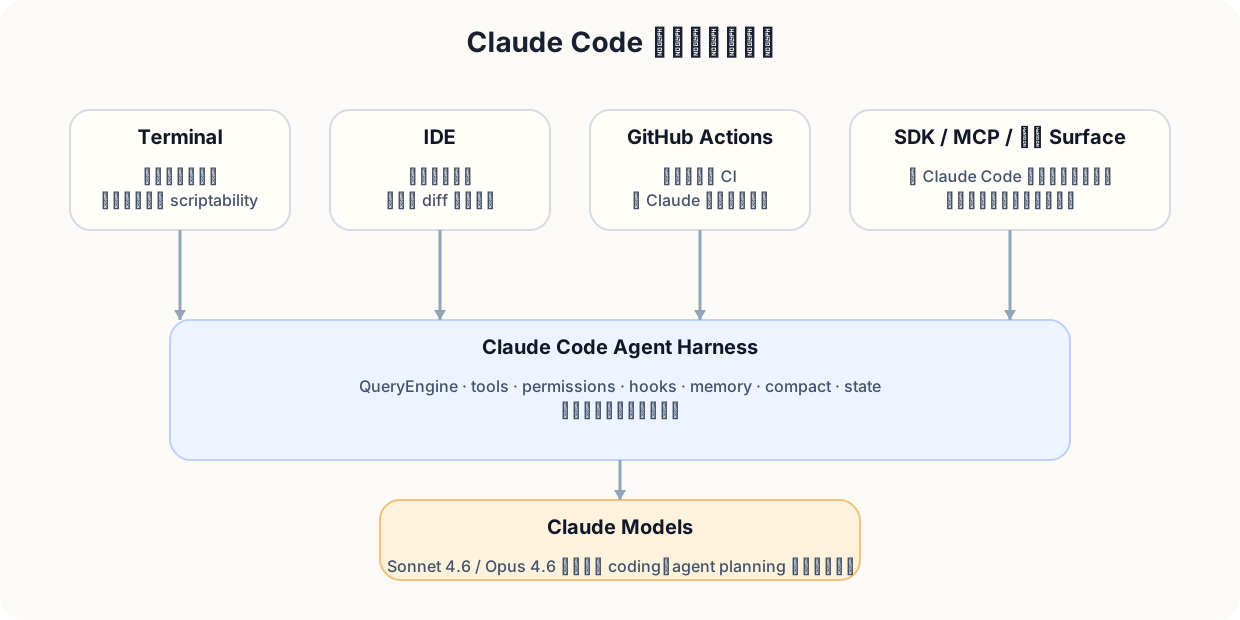
At first glance, Claude Code can look like a terminal utility for programmers. But Anthropic's public trajectory makes it clear that Claude Code is no longer just a single tool. It is the core execution layer through which Claude's software-work agent capabilities appear across **Terminal, IDE, GitHub Actions, SDK, MCP, and the broader Claude work system**.
Figure 1: Claude Code is better understood as a shared execution layer across multiple surfaces than as a standalone terminal binary.
Several signals matter:
- Anthropic's Claude Code overview frames it as an agentic coding tool that can edit files, run commands, integrate MCP, and operate in CI.
- Claude Code SDK says directly that it is built on top of the **agent harness that powers Claude Code**.
- GitHub Actions support sits on top of the Claude Code SDK rather than standing apart from it.
- Later public announcements push surfaces such as VS Code, checkpoints, rewind, background tasks, and subagents into the foreground.
- Model updates such as Sonnet 4.6 and Opus 4.6 increase the practical ceiling of the same harness rather than replacing it.
### Two Layers of Change in 2026
From a PM perspective, the 2026 story has two layers.
#### Layer One: The Model Envelope Became Stronger
Anthropic's newer model line expands coding, long-context reasoning, computer use, and multi-step planning. For Claude Code, that means the same harness now operates with a better planning and execution engine behind it.
#### Layer Two: The Product Surface Became Wider
The terminal remains important, but it is no longer the only surface:
| Surface | What it means for users | What it means for PMs |
| --- | --- | --- |
| Terminal | Maximum control and native development workflow | Preserves scripting power and Unix composability |
| IDE | Better visual feedback and lower learning cost | Reduces adoption friction |
| GitHub Actions | Asynchronous automation in team workflows | Turns Claude from assistant into workflow node |
| SDK | Reuse of the underlying execution layer | Makes platformization and second-order products possible |
| MCP | Standardized connection to tools and data | Expands the ecosystem without rewriting the core product |
### Why This Matters for PMs
When a product shifts from "one interface with features" to "many surfaces sharing one runtime," the product problem changes. You now need to manage:
- which capabilities are common platform capabilities;
- which differences are only surface-level presentation differences;
- which governance rules must remain consistent across every surface;
- and which success metrics should be measured across task completion rather than client-specific engagement.
This is one of the deepest lessons of Claude Code: **the system is worth studying because it shows how agent capabilities become a shared runtime, not just a better front-end.**
### Summary
The most accurate 2026 position is not "Claude in the terminal," but this:
**Claude Code is Anthropic's most mature software-work execution surface, built as a reusable agent runtime across multiple entry points.**
## Chapter 3: A Product Manager's Mental Model of Claude Code
This chapter rewrites the technical structure of Claude Code in product language.
### A More PM-Friendly Structural View
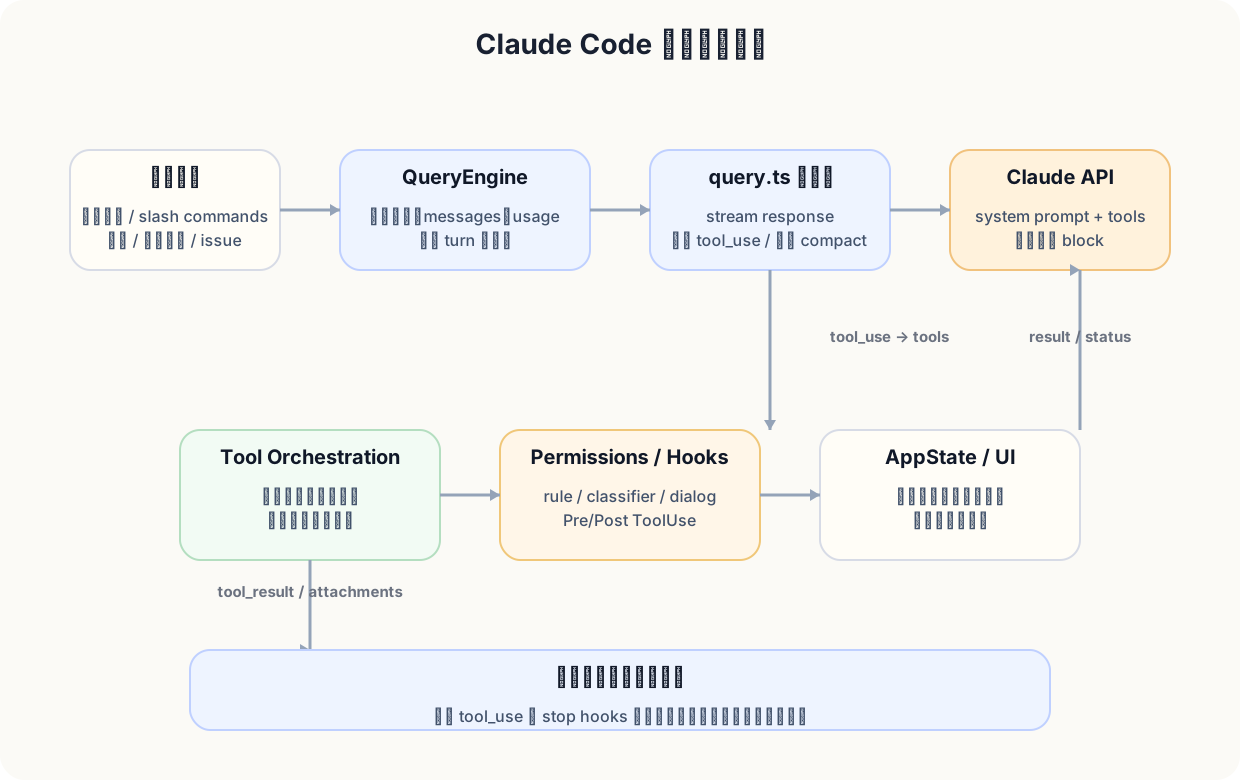
Engineers often start from files such as `entrypoints/cli.tsx`, `main.tsx`, `QueryEngine`, and `query.ts`. For product work, a better starting point is a six-layer system model:
Figure 2: Claude Code's product core is a loop of user task, reasoning, tools, governance, state, and continued progress.
1. **Task expression layer**: users express intent through natural language, slash commands, selections, attachments, issues, and PR comments.
2. **Reasoning and orchestration layer**: QueryEngine and the main query loop decide whether to explain, search, plan, or act.
3. **Tool execution layer**: file tools, shell tools, web tools, MCP tools, subagents, and task helpers are abstracted as tools.
4. **Governance and boundary layer**: permissions, hooks, managed settings, and sandboxing govern whether an action is allowed and how approval works.
5. **Memory and continuity layer**: CLAUDE.md, compact, history, summaries, and session persistence keep work alive over time.
6. **Interaction layer**: the terminal UI, notifications, diff review, resume, rewind, and status updates let the user understand and steer the system.
### Why This Model Is Better Than "Model + Prompt"
Real software work is not a single answer. It is uncertain, iterative, failure-prone, and often cross-system. If you reduce Claude Code to "a good model plus prompts," you miss the main product questions:
- How does the user know what the agent is doing?
- Who carries risk when the system wants to run Bash, edit code, or call remote tools?
- How does it continue after failure?
- What happens when context fills up?
- How can a team govern it across users?
Claude Code matters because those questions were turned into product and systems design, not left as assumptions.
### A Useful Product Formula
You can think of Claude Code's practical outcome as a product of several system qualities:
> **Task quality = model capability × decomposition quality × tool correctness × safety boundary quality × context continuity × visibility and recoverability**
If any one of these collapses to zero, the experience collapses with it. Strong models without tools cannot act. Tools without governance cannot land in teams. Continuity without visibility still feels untrustworthy.
### What PMs Most Often Miss
**Claude Code is a systems product, not a UI veneer over a model.**
You can make the interface beautiful, but if the system lacks tool orchestration, governance, compact, recovery, and long-task continuity, users still will not trust it with real work.
### Summary
The biggest thing to learn is not "how to put AI in the terminal." It is **how to turn a reasoning system into a product that can collaborate over time.**
## Chapter 4: Core User Journeys: How Claude Code Is Used in Real Development Work
This chapter looks at Claude Code from the point of view of user journeys rather than code files.
### Four Journeys That Matter Most
At least four recurring journeys stand out:
| Journey | Typical input | Key Claude Code capability |
| --- | --- | --- |
| Repository onboarding | "Explain how the billing service works" | Agentic search, file reading, structural mapping, planning |
| Feature implementation | "Add a reason code to refunds" | Code understanding, multi-file editing, testing, iteration |
| Debug and repair | "Where does this stack trace come from?" | Logs, code reading, shell execution, repeated repair loops |
| Workflow automation | "@claude, handle this PR task" | Headless execution, SDK, Actions, permission boundaries |
### Journey 1: Understanding a New Repository
Users entering an unfamiliar codebase rarely want only an answer. They want a usable map. Claude Code adds value when it actively reads files, searches symbols, traces dependencies, and produces a working orientation instead of a shallow explanation.
### Journey 2: Moving From Requirement to Implementation
The second major journey is turning a rough requirement into an executable plan. Claude Code helps by breaking a task into changes, finding relevant files, running tests, and revising after each new finding. The important product lesson is that implementation is a **loop**, not a one-shot instruction.
### Journey 3: Debugging and Verification
A serious coding agent needs to survive failure. Claude Code is strong in debugging because it can observe logs, run commands, inspect source, form a hypothesis, edit the code, and validate. The "keep going until it is actually fixed" loop is part of the product, not an accidental side effect.
### Journey 4: From Personal Assistant to Workflow Node
The final journey is where Claude Code stops being only a personal tool and becomes part of a process. Through SDK, headless modes, and GitHub Actions, it can become an asynchronous actor in engineering operations.
### Summary
Claude Code's product value is not that it can answer questions about code. Its value is that it can **move software work across a chain of actions**: understand, plan, act, verify, and continue.
## Chapter 5: Why Claude Code Feels Better: Six Product-Level Reasons
This chapter explains the experience gap without reducing it to "the model is stronger."
### It Is Not Only About Model Strength
Claude Code often feels better because multiple system advantages compound together:
1. It was built for **task continuation**, not only single answers.
2. It has a broad and relatively coherent **tool layer**.
3. It has visible **permission and governance boundaries**.
4. It has **context continuity** across long sessions.
5. It gives users meaningful **visibility and control** during execution.
6. It is designed as an **extensible runtime**, not only a fixed app.
The result is a feeling of maturity. Users do not experience only "better output." They experience a system that seems more able to keep working without falling apart.
### A Commonly Missed Reason: Less Performance, More Progress
Claude Code often performs fewer theatrical explanations than many AI tools. It spends more of its product energy on finding the next useful action. This matters. Systems that optimize for sounding smart often lose time; systems that optimize for moving the task forward create trust.
### What PMs Can Reuse
Several lessons generalize well:
- optimize for **task advancement**, not only response impressiveness;
- make the tool layer visible but not noisy;
- let safety boundaries be part of the product architecture, not an afterthought;
- treat context continuity as a first-class feature in long-task products.
## Chapter 6: Read the Snapshot Correctly First: What It Is, and What It Is Not
Before making deep claims, this chapter defines the evidence boundaries of the cc2.1.88 source snapshot.
### Snapshot Profile
The package you provided is not a typical full development repository. It is closer to a **release or distribution snapshot**. It is useful for runtime and architecture analysis, but not a perfect mirror of every internal build, every workflow, or every service-side dependency.
### What the Snapshot Shows Best
It is strongest at revealing:
- the startup path and execution skeleton;
- the QueryEngine and query loop;
- the tool system and orchestration rules;
- governance prompts and permission mechanisms;
- the prompt stack, memory, and compact behaviors;
- and a large share of the client-side or distributed-runtime logic.
### What It Does Not Prove by Itself
It does not by itself prove:
- the entire server-side truth;
- every feature flag combination used in production;
- all enterprise-only or managed deployments;
- or every operational system around analytics, experiments, and hosting.
### Why This Distinction Matters
PMs often over-read snapshots. A release snapshot is extremely valuable, but it must be read with evidence discipline. The healthiest position is: use the snapshot to understand runtime design, then use public materials to contextualize product-state claims.
### One Snapshot Feature PMs Should Remember: Lots of Feature Flags
A flag-heavy system signals that the runtime was designed for experimentation, staged rollout, safety control, and platform evolution. That is a product lesson in itself: mature AI systems are rarely one static configuration.
### Summary
The snapshot is strong evidence for runtime architecture. It is not a license to invent server-side certainties.
## Chapter 7: The Startup Path: How Claude Code Boots
The startup layer tells you a lot about the product before you ever reach QueryEngine.
### Start With Boot, Not With QueryEngine
There is a common mistake in source reading: jumping straight into the "intelligent" part. Claude Code is easier to understand if you start with how it boots, routes, and enters different modes. Startup is the first sign that this is not a naïve CLI.
### Why It Is Designed This Way
A system with multiple surfaces, multiple execution modes, and multiple governance boundaries needs a startup path that behaves like a dispatcher, not a thin main function. Startup time, mode branching, environment setup, and configuration loading are part of the product experience.
### Engineering Intentions Visible at This Layer
You can infer several intentions from the boot layer:
- keep entry modes explicit;
- centralize environment and settings loading;
- make future surfaces easier to add;
- avoid letting each mode invent its own runtime rules.
### A Clear Product Implication: Startup Time Is Part of UX
In an agent system, startup delay is not only an engineering metric. It affects whether the tool feels responsive enough to enter daily workflows.
### What PMs Can Learn Here
The first screen a user sees is not just branding. It is the first proof that the system is coherent.
### Summary
The startup path is the first clue that Claude Code behaves more like an application runtime than a thin command wrapper.
## Chapter 8: QueryEngine and the Main Loop: The Heart of Claude Code
If Claude Code has a heart, it is here.
### Start With the Definition of QueryEngine
QueryEngine matters because it is not just "send a message to the model." It manages the loop in which the system decides, acts, observes, and continues. This is where the agent harness becomes real.
### What the Main Loop Actually Does
At a high level, the loop repeatedly does the following:
1. read the user's current task and the available context;
2. reason about the next useful action;
3. call tools when the system needs more evidence or needs to act;
4. ingest new results and update the working context;
5. continue until the task is complete, blocked, or handed back to the user.
That loop is the main difference between a chatbot and a working execution system.
### Why QueryEngine Matters So Much
QueryEngine is where several crucial product behaviors intersect:
- task decomposition;
- tool sequencing;
- loop continuation after failure;
- interaction with governance decisions;
- and the relationship between user intent and system progress.
### Why the Product Feels Different Because of It
When users say Claude Code feels more capable, what they often feel is not only model strength. They feel a runtime that keeps momentum because the loop is designed to act, recover, and continue.
### Summary
QueryEngine is not a helper class. It is the practical expression of Claude Code's product identity.
## Chapter 9: The Tool System: How Claude Code Decides, Calls, and Orchestrates Tools
This chapter explains Claude Code's action layer.
### Why Claude Code Looks Like It Can "Actually Do Things"
Claude Code feels actionable because it is connected to a large tool layer. Those tools are not random utilities; they are wrapped and orchestrated under shared rules.
### A PM-Friendly Way To Read the Tool Layer
Think of the tool layer as the product's **action market**. The model proposes intent, but tools determine what the system can actually inspect, edit, execute, and validate.
### Why BashTool Is So Heavy
Bash is powerful and dangerous. The reason BashTool is comparatively rich is simple: shell execution is often the difference between a toy coding assistant and a real software-work agent. It therefore needs strong governance, messaging, and execution discipline.
### Tool Concurrency Is Not Default Chaos
Claude Code does not simply fire tools in parallel by default. The orchestration logic is shaped by safety classes, tool semantics, and prompt-caching stability. That design communicates a serious product philosophy: concurrency is useful, but not at the expense of correctness and control.
### Why ToolSearch Exists
When a system exposes many tools, discovery becomes part of usability. ToolSearch is a product clue that the team was thinking not only about capability breadth, but also about how the model should find the right tool at the right time.
### Summary
The tool system is not a bag of powers. It is a governed action layer with selection rules, safety boundaries, and orchestration logic.
## Chapter 10: Permissions, Safety, and Governance: Why It Can Automate Without Fully Losing Control
A mature agent product must answer one question clearly: **who decides?**
### A Serious Agent Must Resolve Decision Authority
If the system can run commands, modify files, and interact with external surfaces, it needs a strong answer to authority, approval, and safety boundaries. Claude Code's governance layer is one of its clearest signs of product maturity.
### How Permission Messages Are Structured
Permission messaging is not decorative. It is part of the contract between the agent and the user. Good permission requests explain not just *what* the tool wants to do, but *why* the action matters in the context of the task.
### What the Governance Pipeline Looks Like
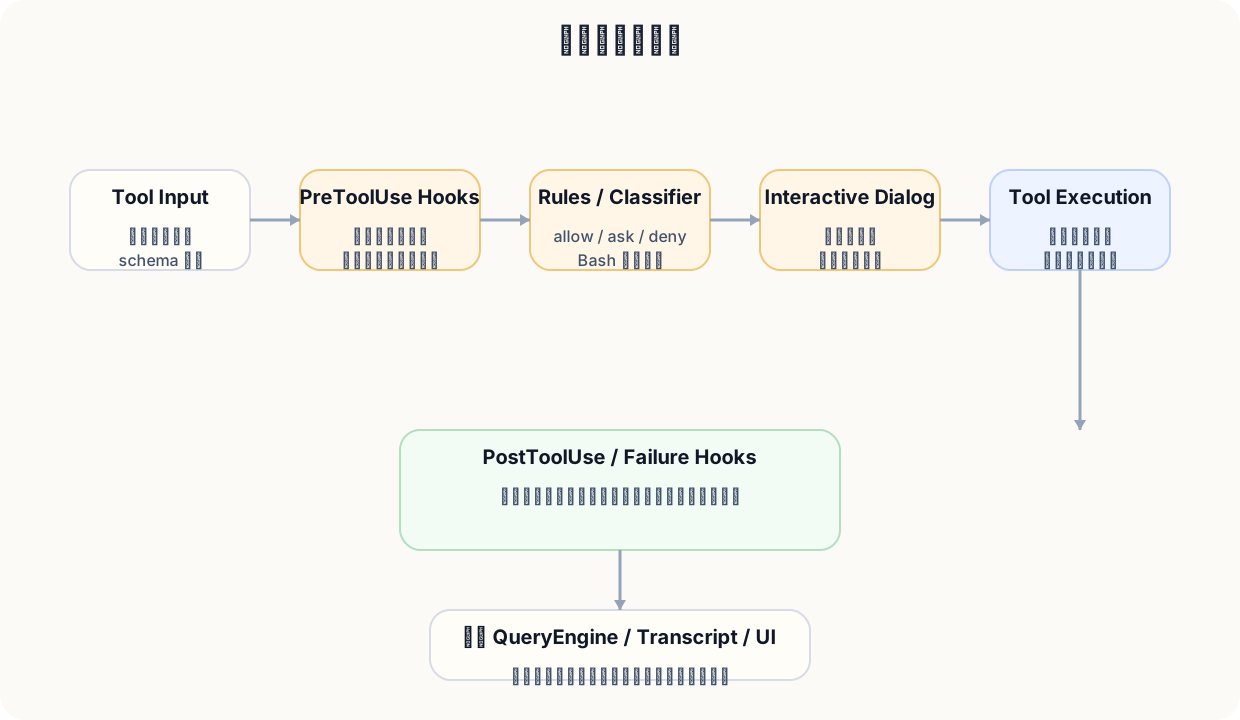
The governance chain is multi-layered:
- rules and managed settings constrain baseline behavior;
- hooks can add policy and operational gates;
- classifiers help determine risk patterns;
- dialogs and approval flows expose control to the user.
This is one reason Claude Code can automate without feeling reckless.
Figure 3: Claude Code's governance model is a layered pipeline, not a single pop-up prompt.
### Why Hooks Matter
Hooks matter because they let teams insert organization-specific controls without rewriting the whole product. They are a platform move as much as a safety move.
### Why There Are Multiple Layers Instead of One
Different layers solve different problems:
- rules define broad policy;
- hooks handle extensible policy and workflow logic;
- classifiers help with dynamic risk interpretation;
- dialogs preserve explicit user control.
This is platform design, not feature clutter.
### Summary
Claude Code's governance system is part of why teams can imagine trusting it in real workflows.
## Chapter 11: The Prompt Stack: Claude Code's Prompting Is a System, Not a Sentence
Prompting inside Claude Code is a stack, not a single string.
### Start With Dynamic System Prompt Boundaries
One of the most important source-level observations is that the system prompt has dynamic boundaries. The runtime decides what belongs in the prompt at a given moment based on mode, tools, settings, and context.
### The Prompt Stack Has Six Layers
From a PM perspective, the prompt system can be understood as six interacting layers:
1. system prompt;
2. tool prompt and schema framing;
3. task prompt;
4. compact prompt;
5. memory inputs;
6. settings and runtime context.
### System Prompting Is Not Just About Tone
In serious agent products, the system prompt is not there only to make responses sound nicer. It encodes policy, workflow rules, delegation expectations, and behavior boundaries.
### The "Doing Tasks" Section Is Almost a Product Constitution
Sections that govern task behavior often function like a product constitution. They are where the system defines how to proceed, when to question assumptions, how to use tools, and how to report progress.
### Compact Is Also Part of the Prompt Stack
Compact is not a separate cleanup feature floating outside prompting. It is a mechanism that preserves working state when context must be compressed. That makes it part of the same stack.
### Summary
Claude Code's prompt design is systemic. It is tightly tied to tools, safety, continuity, and runtime mode.
## Chapter 12: Context, Memory, and Compact: Why Long Tasks Can Continue
Long tasks fail in most systems for predictable reasons.
### Why Long Tasks Break
They break because context becomes too large, relevant details are lost, tool decisions become unstable, and the agent forgets the working state needed to continue.
### Design 1: Dynamic System Boundaries
Dynamic prompt boundaries keep the prompt focused on what matters now rather than carrying every historical detail equally.
### Design 2: Tool Ordering Serves Prompt-Cache Stability
The ordering and stability of tool descriptions affect prompt-cache efficiency and runtime consistency. That is a subtle but important systems lesson: even tool ordering can influence product quality.
### Design 3: Memory Is Not a Single File
Claude Code's memory model is tiered. There are multiple places where durable or semi-durable context can live, each with different purpose and scope.
### Design 4: Compact Is Not Deletion, but State Migration
Compact is best understood as **state migration**. The system is not merely deleting old messages. It is attempting to preserve the working state in a more compact form so the task can continue.
### What PMs Can Learn From This
Any serious long-horizon AI product needs a continuity strategy that treats memory and compression as product primitives, not back-end cleanup tricks.
### Summary
Long-task continuity is a design achievement. Claude Code handles it through a combination of prompt boundaries, memory layers, and compact-driven state transfer.
## Chapter 13: State, UI, Recovery, Remote, and Multi-Agent Support: Why It Feels Like an App, Not a Shell Wrapper
This chapter explains why Claude Code feels like a terminal application instead of a thin wrapper around shell commands.
### Why the Terminal Still Feels Like an Application
Claude Code's UI is not minimal in the sense of "do almost nothing." It is minimal in the sense of "show the right operational state at the right time." That is why it feels application-like even inside the terminal.
### Why the CLI Needs Such a Heavy State System
Once a tool becomes a long-running agent runtime, state is no longer optional. The system needs to remember in-progress actions, approval states, recoverable work, current surfaces, and resumable sessions.
### Recovery Is a Source of Trust
Recovery features such as resume and rewind matter because they turn failure and interruption into manageable product states instead of hard resets.
### What Subagents and Multi-Agent Support Mean
Subagents matter because they let the system create scoped workstreams while preserving a higher-level task frame. This is one of the places where Claude Code starts to look more like a multi-process collaboration environment than a single assistant.
### Why Remote and Bridge Matter Too
Remote and bridge concepts are signs that the team was thinking beyond one local terminal session. The product is trying to support more distributed working contexts.
### Summary
Claude Code feels like an application because it was designed as one: stateful, recoverable, multi-surface, and operationally legible.
## Chapter 14: The Extension Layer: CLAUDE.md, Slash Commands, Hooks, MCP, Subagents, SDK, and GitHub Actions
Claude Code does not expand through one vague idea called "plugins." It expands through several distinct layers.
### It Is Not a Single Plugin Story
Each extension layer has a different responsibility:
- **CLAUDE.md** carries durable instructions and local collaboration norms.
- **Slash commands** provide reusable interaction shortcuts.
- **Hooks** inject policy and automation behavior.
- **MCP** connects external tools and data sources in a standardized way.
- **Subagents** create scoped auxiliary workstreams.
- **SDK** exposes the runtime for other products and workflows.
- **GitHub Actions** turns that runtime into asynchronous workflow automation.
### Three Distinctions PMs Commonly Blur
#### 1. CLAUDE.md Is Not the Same as Settings
Settings are configuration. CLAUDE.md is instruction-bearing collaboration context.
#### 2. Hooks Are Not the Same as Slash Commands
Hooks are automation or governance surfaces. Slash commands are user-facing interaction shortcuts.
#### 3. MCP Is Not the Same as SDK
MCP standardizes tool and data connectivity. SDK exposes the runtime for application building.
### Why This Layering Looks Like Platform Design
This layered model is a platform move. Different extension points allow different forms of control, integration, and reuse without forcing everything through one unstable mechanism.
### Summary
Claude Code's extension model is strong because it respects separation of concerns instead of collapsing everything into a single extensibility metaphor.
## Chapter 15: Claude Code's Real Differences from Other CLI Agents, and Where Its Limits Are
This chapter makes the comparison honest.
### The Real Differences Are Not Just "It Is Smarter"
Claude Code feels different because of the whole stack: execution loop, tool breadth, governance, continuity, recovery, and platform surfaces. Intelligence is necessary, but not sufficient.
### But It Also Has Clear Limits
#### Limit 1: It Still Makes Model Mistakes
No matter how well the harness is designed, the underlying model can still reason incorrectly or miss important evidence.
#### Limit 2: Stronger Tools Require Stronger Governance
The more powerful the tool layer becomes, the more serious governance must become.
#### Limit 3: Continuity for Long Tasks Is Not Free
Even with compact and memory, long tasks still impose real complexity and can drift.
#### Limit 4: A Snapshot Cannot Reveal the Entire Server-Side Truth
A release snapshot is powerful evidence, but it is not complete access to Anthropic's internal operating environment.
#### Limit 5: Enterprise Adoption Means Organizational Complexity
Team rollout introduces policy, training, observability, and approval-chain questions that no model quality alone can solve.
### Why Acknowledging Limits Matters
A product is easier to trust when its real trade-offs are visible. Over-romanticizing AI systems makes adoption harder, not easier.
### Summary
Claude Code is impressive not because it is magic, but because its strengths and limitations are expressed through a mature systems design.
## Chapter 16: A Final Chapter for Product Managers: How To Adopt Claude Code, and What You Can Learn From It
This final chapter turns the analysis into adoption advice and reusable product lessons.
### If You Want To Adopt Claude Code in a Team
#### Stage 1: Individual Pilot
Start with a small number of technically fluent users and clear task types. Use the pilot to learn where the tool is strongest and where governance friction appears.
#### Stage 2: Team Standardization
Once the value is clear, standardize instructions, approval practices, and usage boundaries. This is where CLAUDE.md, hooks, settings, and managed policies begin to matter more.
#### Stage 3: Platformization and Automation
The final stage is when Claude Code is not only a personal assistant, but a workflow component. SDK, Actions, MCP, and governance become the basis for broader organizational automation.
### If You Are Building Your Own AI Product, What Is Most Worth Learning?
The deepest lessons are these:
- design for task continuation rather than single-turn brilliance;
- treat safety and permissions as product architecture;
- build recovery and visibility into the user experience;
- separate extension layers by responsibility;
- and design continuity mechanisms for long-running work.
### A Suggested Order for Reading the Source
If you are studying the codebase itself, a useful path is:
1. startup and entry routing;
2. QueryEngine and query loop;
3. tool abstractions and orchestration;
4. permissions, hooks, and managed settings;
5. prompt stack, memory, and compact;
6. state, UI, recovery, remote, and extension surfaces.
### Final Conclusion
Claude Code is worth studying not because it is a fashionable AI tool, but because it shows what it takes to turn model capability into a durable software-work product.
For PMs, the real lesson is this:
**The future of AI products will belong to systems that can reason, act, remain governable, preserve continuity, and keep earning user trust over time. Claude Code is one of the clearest working examples of that idea today.**
## Appendix A: Glossary for Product Managers
| Term | Explanation |
| --- | --- |
| Agent harness | The runtime framework that lets a model plan, call tools, manage state, and continue a task |
| QueryEngine | The core orchestration loop that keeps work moving forward |
| Tool orchestration | The logic that selects, sequences, and governs tool calls |
| Permission mode | The rule set that determines how and when approval is required |
| Hook | A programmable control point for workflow or policy logic |
| Managed settings | Organization-level settings that constrain or shape runtime behavior |
| Compact | A mechanism for compressing history while preserving working state |
| MCP | Model Context Protocol, used for standardized tool and data integration |
| Subagent | A scoped delegated worker inside the larger task flow |
| Surface | An interaction entry point such as terminal, IDE, or GitHub Actions |
| Runtime continuity | The system's ability to preserve task progress across time and interruption |
| Recovery | Resume, rewind, and similar capabilities that let work continue safely |
## Appendix B: Key Source File Map
| Area | What to look for |
| --- | --- |
| Startup and entrypoints | How the system branches by mode, surface, and environment |
| QueryEngine and query loop | How tasks are decomposed and continued |
| Tool registry and orchestration | How tools are selected, described, and batched |
| Permissions and governance | How safety decisions, approval requests, and policy layers work |
| Prompt stack | How system, task, tools, compact, memory, and settings interact |
| Memory and compact | How long-task continuity is preserved |
| App state and UI | How a terminal interface becomes application-like |
| Extensions | How CLAUDE.md, hooks, MCP, subagents, SDK, and Actions divide responsibility |
## Appendix C: Public Materials Used in This Book (through March 31, 2026)
- Anthropic's Claude Code overview materials
- Claude Code SDK documentation
- GitHub Actions integration documentation
- Anthropic public blog posts and release notes covering Claude Code surfaces and model updates
- Public references on Sonnet 4.6 and Opus 4.6
- Public discussions of MCP and Claude ecosystem integration surfaces
## Appendix D: Important Source Excerpt Index
### 1) Dynamic Boundaries in the System Prompt
This excerpt matters because it shows that the system prompt is assembled as a runtime structure rather than one static string.
```ts
function getSimpleSystemSection(): string {
const items = [
getCoreIdentitySection(),
getSafetySection(),
getToolPolicySection(),
]
return items.filter(Boolean).join('\n\n')
}
```
### 2) System Rule Segments
These rule segments behave like product law: they constrain how the agent should reason, ask questions, use tools, and surface uncertainty.
```ts
const SYSTEM_RULES = [
'Prioritize the user task',
'Do not fabricate results',
'Use tools when evidence is required',
]
```
### 3) The "Doing Tasks" Fragment
This part is worth studying because it is effectively the behavioral constitution of the runtime.
```ts
const DOING_TASKS = `
Work step by step.
Use tools when needed.
Surface blockers honestly.
Keep the user informed of progress.
`
```
### 4) Background-Usage Notes in BashTool
These notes show that the product team was thinking carefully about asynchronous command execution and user expectations.
```ts
function getBackgroundUsageNote(): string | null {
if (!supportsBackgroundMode()) return null
return 'This command may continue in the background while other work proceeds.'
}
```
### 5) Git Constraints in BashTool
The git-related constraints are an important example of productized safety boundaries around destructive operations.
```ts
const GIT_CONSTRAINTS = [
'Avoid destructive git operations by default',
'Do not rewrite user history without explicit instruction',
]
```
### 6) ToolSearch Prompt Logic
ToolSearch matters because it shows that tool discovery itself is treated as a runtime product problem.
```ts
const PROMPT_HEAD = `Fetch full schema definitions for deferred tools so they can be called.`
```
### 7) QueryEngine Commentary
The QueryEngine commentary makes the runtime intent especially visible: keep tasks moving, not merely keep talking.
```ts
/**
* QueryEngine advances the user's task by reasoning, invoking tools,
* absorbing new evidence, and continuing until a stable handoff point.
*/
```
### 8) Tool-Orchestration Rules
The orchestration rules demonstrate that concurrency and batching are constrained by semantics and safety.
```ts
/**
* Partition tool calls into batches where each batch is either:
* - safe to run in parallel
* - or ordered because of dependency or risk constraints
*/
```
### 9) Compact Prompt Fragment
Compact is central because it shows that continuity is handled as intentional state transfer.
```ts
const BASE_COMPACT_PROMPT = `
Create a detailed summary of the conversation so far, with attention to
the user's explicit requests and the assistant's previous actions.
`
```
### 10) Permission-Request Messaging
Permission-request phrasing reveals how much product thought went into balancing autonomy with user control.
```ts
function createPermissionRequestMessage(action: string, reason: string): string {
return `Claude Code wants to ${action}. Reason: ${reason}`
}
```